
Installing and Uninstalling a Sepio Agent
Preparing for Installation
You can install Sepio Agent in one of two ways:
- Locally on each user’s computer as a standalone installation.
- Using a network deployment tool compatible with MSI installation packages (e.g., Microsoft Endpoint Configuration Manager).
Typically, the local installation is simpler and easier to deploy for a single computer or a small network. However, larger-scale networks that use centralized management and administration tools usually use network installation to pre-configure some setup parameters.
Firewall Configuration
Sepio Agent uses HTTPS for communication between Sepio Agent and the Platform Management. We recommend using the standard port 443. Ensure it is enabled on Windows by adding to Windows Firewall and in Linux by running the required command.
Windows Installation
Windows GUI
- Download the current version of the Sepio Agent for Windows.
- Double-click the downloaded file to start the installation.
- Click Next.
- Select ‘I accept the terms in the License Agreement’ then click Next.
- If required click Browse to change the file location and enter the FQDN of the Platform Management server.
- Click Install.
- Click Finish to complete the installation. You can now log in to Sepio.
Windows CLI
Run the Agent installation with the Platform Management (Server) address:
%SepioAgent_Win_64_<sepio agent version>.msi /q CENTRALIZEDIP=<Platform Management FQDN>
- CENTRALIZEDIP=server.domain.com
- CENTRALIZEDIP=server.subdomain.domain.com
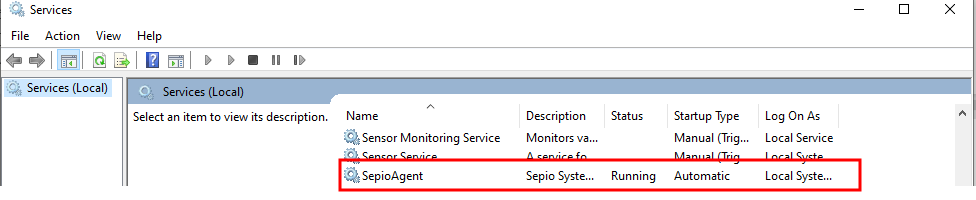
Ensure the Sepio Agent is Running as a service on Windows
Linux Installation
The Sepio Linux Agent is provided for Debian, Ubuntu, and Red Hat based systems. Installation files include:
- Dependencies.txt
- LinuxInstallation[Deb/RH].sh
- LinuxUninstall[Deb/RH].sh
- Scripts.sh
sepio.agent<version>.[deb/rpm]sepio.agent.[deb/rh].service
Installation Path
- Ubuntu: /debian/netcoreapp/opt/sepio.agent/Sepio.Agent
- Redhat: /usr/local/bin/sepio.agent
Dependencies: The Dependencies.txt file lists dependencies required for installation.
- Download the current version of the Sepio Agent for Linux.
- Extract files if needed:
tar -xzvf <filename> - Modify or disable Recovery Override mechanism if required.
- For Ubuntu:
sudo ./LinuxInstallationDeb.sh CENTRALIZEDIP=<Platform Management FQDN> - For RHEL:
sudo ./LinuxInstallationRh.sh CENTRALIZEDIP=<Platform Management FQDN>
Silent Installation Using Script
- Download installer .pkg file.
- Fresh installation:
sudo ./install_agent.sh --url "your-server.sepio.com" --pkg "SepioAgent_Mac_xx.pkg" - Upgrade:
sudo ./install_agent.sh --pkg "SepioAgent_Mac_xx.pkg" - Uninstallation:
sudo ./clean.sh - Verify agent:
launchctl list | grep sepio
Uninstalling a Sepio Agent
Windows:
- Control Panel → Programs and Features → Uninstall a program → SepioAgent → Uninstall
Linux:
- Run LinuxUninstall[Deb/RH].sh script in installation folder
macOS:
- Run
sudo ./clean.shin terminal
Redirecting Sepio Traffic and Changing the Platform Management
- Assets Visibility → Hosts.
- Select host, click icon.
- Enter host FQDN:
Host=server.domain.comorHost=server.subdomain.domain.com - Click Save.